Publishing your movie
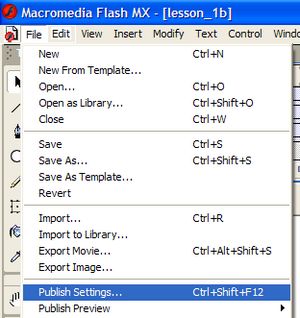
| Now that you have finished your movie, you can publish it to a flash file that can be played using Internet Explorer or added to a PowerPoint slide. You will publish the movie to a shockwave flash file (.swf) and also produce a web page that plays the file automatically. Click on File in the main menu and then Publish Settings...".
|
 |
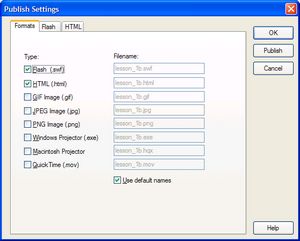
Check that the two default options - flash and html are selected and then click on the Publish button. Flash will compile the flash file, construct a web page and then save both to the folder where you have been saving the working file. You can then click on the OK button to return to the design. The Flash and HTML tabs provide settings for the way that flash should save the files. Have a look at the options but the default settings will work fine for most situations. |
 |
Once you have checked the publish settings in this way you can publish the flash file to the working folder by File and then Publish. The last part of this lesson shows you how you can play your movie. |
|
