One last thing...
| You are probably thinking that this has been a lot of effort to produce something that is really rather like PowerPoint. To make matters worse, it isn't always easy to adapt a flash movie to do something different so you might be faced with starting from scratch for the next one! One way to overcome this is to use Flash's facility for swapping images and symbols. This means that you can insert different objects into a movie without having to redesign it from the bottom up. |
|
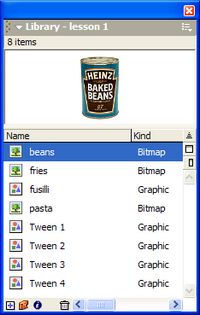
Press the F11 key to bring up the Library window. It shows the main objects in the movie. Right-click on beans in the library and select Properties.... Click on the Import button. Navigate to the folder where you originally found the food images and select the perrier image. When you click on OK, the picture of the Perrier bottle will replace the beans and it will animate in the same way. This trick works best if you have a set of images that are all a similar size, otherwise you may find yourself moving things about on the stage and this can be tricky. |
 |
