Handling mouse events
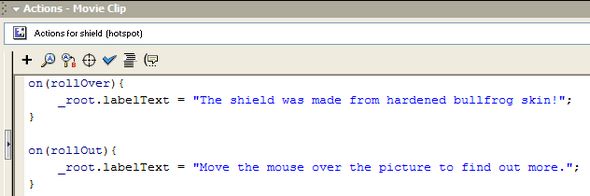
| Make sure that you have selected the shield hotspot. Press F9 to open the Actions pane. Enter the following ActionScript in the pane. The actual text between the double-quotes is up to you! |
|
 |
|
Taking it from the top... |
|
| on (rollOver) |
means - if the user moves the mouse over the symbol, do the instruction inside the curly brackets ({}). |
_root.labelText = "The shield..."; |
means - make the variable labelText contain the text inside the double quotes. The semi-colon tells Flash that it is the end of the instruction. |
on (rollOut) |
means - if the user moves the mouse out of the symbol's boundaries, do the instruction inside the curly brackets. |
_root.labelText = "Move the..."; |
resets the text to the instruction that was shown when the movie started. |
|
|
The addition of _root. in front of the variable's name is used so that it can be referred to in any part of the movie and Flash can access its value. |
|
Its about time that you found out if the movie works. Select Control and then Test Movie. The movie will be compiled and then displayed in the Flash player window. Good Luck! |
|
